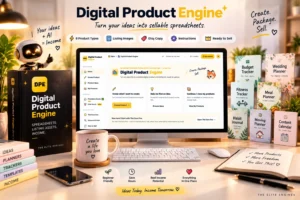
Creating digital products sounds simple at first. You come up with an idea, make a spreadsheet or planner, upload it to a marketplace, and wait for customers to find it.
But anyone who has tried selling digital products knows there is more to the process.
You also need attractive product images, a useful description, relevant keywords, and a product that actually works. Then comes the challenge of getting your listing in front of the right buyers.
This is where Digital Product Engine, also known as DPE Starter, tries to make things easier.
The software is designed to help users create spreadsheet-based digital products and generate many of the assets needed for an Etsy listing. It also comes with beginner-focused guides and a collection of product ideas.
But is it a useful shortcut for digital product sellers, or is it another tool that sounds better on a sales page than it does in practice?
In this Digital Product Engine review, we’ll look at its features, pricing, credits, potential advantages, drawbacks, refund policy, and the type of person who might benefit from using it.
Let’s take a closer look.
Digital Product Engine Review: At a Glance
| Feature | Details |
|---|---|
| Product name | Digital Product Engine (DPE Starter) |
| Vendor | The Elite Engines |
| Main purpose | Create spreadsheet-based digital products and listing assets |
| Product creation | AI-assisted generation |
| Starting price | $12.95 one-time, as displayed on the sales page |
| Included credits | 650 credits |
| Approximate starter capacity | Around 10 builds, according to the vendor |
| Supported product types | 8 spreadsheet categories in the Starter offer |
| Download formats | XLSX, CSV, and Notion import files |
| Listing materials | Product images, a short listing video, title, tags, and description |
| Additional resources | Five guides and a 60-idea planner |
| Refund policy | 30-day money-back guarantee advertised by the vendor |
| Best suited for | Beginners and digital product sellers who want to streamline product creation |
Prices and offer details can change, so check the current checkout page before purchasing.
What Is Digital Product Engine?
Digital Product Engine is an AI-assisted product creation tool developed by The Elite Engines.
Its main focus is helping users produce spreadsheet-based digital products without having to create every element manually.
Imagine you want to sell a personal budget planner on Etsy.
Normally, you might need to plan the workbook structure, create spreadsheet formulas, design listing images, write a product title, research tags, and prepare a description. If you’re new to the process, even one listing can involve several hours of work.
Digital Product Engine is designed to bring many of those tasks together.
According to the vendor’s sales page, you select a product category, describe the product you want, and generate a package containing the spreadsheet and supporting listing materials.
The idea is straightforward: spend less time putting together the technical pieces and more time deciding what to sell, who needs it, and how to position it.
That could be useful for people who have product ideas but find the production process overwhelming.
However, there is an important distinction here. Digital Product Engine is a creation tool, not a guarantee of a profitable digital product business. Your products still need to solve real problems, offer value, comply with marketplace rules, and reach potential buyers.
What Do You Get With Digital Product Engine?
The DPE Starter offer includes several components. Here’s what the vendor says is included.
1. Spreadsheet Product Creation
The Starter version supports eight advertised spreadsheet product categories:
- Personal budget planners
- Debt payoff trackers
- Meal planners
- Fitness trackers
- Habit trackers
- Wedding planners
- Moving and relocation planners
- Content calendars
You choose a category and describe the version you want to create.
For example, instead of making a generic budget spreadsheet, you could describe a monthly household budget tracker designed for people who want to organize bills, expenses, savings, and financial goals.
A more specific product idea gives you a clearer starting point for evaluating the generated output.
The software is advertised as creating spreadsheet workbooks with formulas. Even so, you should test the formulas, calculations, and dropdowns before offering the product to paying customers. Automated generation does not remove the need for quality control.
2. Excel and Google Sheets-Compatible Files
The vendor says each generated product includes an XLSX workbook that can be opened in Microsoft Excel or Google Sheets.
The download also includes CSV files and a Notion import file.
That flexibility could be helpful because buyers may prefer different ways to manage their information.
For example, someone purchasing a meal planner might prefer a spreadsheet, while another customer may want to import the information into a Notion-based workflow.
Before publishing, open the files in the applications you plan to support. Check the formatting, formulas, imported data, and any features that might behave differently between applications.
3. Etsy Listing Images
Product presentation matters when customers are browsing a marketplace.
Digital Product Engine advertises seven to nine listing images for each build, designed around the product’s tabs or sections.
This could save time for sellers who aren’t comfortable working with graphic design software or creating product mockups.
Still, generated images should be checked carefully. Make sure the text is readable, the screenshots accurately represent the actual download, and the images don’t promise features the product lacks.
If an image makes a feature look more polished than the real workbook, edit it before publishing.
4. Short Listing Video
The vendor also advertises a short video for the Etsy listing.
A video can help demonstrate how a spreadsheet is organized and what a customer receives.
For a budget planner, for example, it might show the expense categories, monthly totals, or savings tracker.
This is potentially useful because customers may want to understand how a digital product works before purchasing it.
However, the video should accurately represent the finished product. Check it for visual errors and confirm that the demonstrated features actually work.
5. Product Titles, Tags, and Descriptions
Writing a listing can take nearly as much thought as creating the product itself.
DPE Starter advertises the following listing materials:
- An Etsy product title
- All 13 listing tags
- A product description
- Buyer-use terms
- An AI-disclosure statement
These elements provide a starting point for publishing a product listing.
For a beginner, having the basic copy prepared can make the process feel much more manageable.
But there is a catch: generated copy isn’t automatically effective copy.
You should check whether the title accurately describes the product, the tags match relevant searches, and the description answers buyers’ questions.
Etsy explains that search considers multiple aspects of a listing, including titles, tags, attributes, descriptions, images, and other factors. Therefore, receiving 13 tags does not guarantee that your listing will rank highly or generate sales. See Etsy’s official guide to search.
6. DPE Core Five Guides
Digital Product Engine also includes a collection called DPE Core Five.
According to the vendor, these five guides cover:
- What to sell
- Who buys it
- Where to sell it
- When to launch
- How to sell it
The guides are intended to help beginners think through the broader digital product business rather than focusing only on making files.
This is a sensible addition because choosing a product idea is often one of the hardest early decisions.
Instead of creating random planners and hoping someone buys them, you can use the material as a starting point for identifying a specific audience and the problem you want to solve.
The guides are educational resources, though. They should not be treated as a substitute for researching actual customer demand.
7. The 60 Ideas & Planner
The offer also includes a planner containing 60 product ideas.
The vendor says it provides information about potential buyers, where products may be sold, approximate difficulty, and estimated creation time. It also references comparisons across 16 selling platforms and a month-by-month selling calendar.
This could be useful when you’re struggling to decide what to create next.
For example, you might compare a meal planner with a content calendar before committing your time to either idea.
The important step is to validate the idea before creating multiple versions. Look at competing products, customer feedback, the problems buyers mention, and whether you can make something meaningfully different.
Having 60 ideas gives you options. It doesn’t mean all 60 are profitable opportunities.
8. Your Own Elite Store
The vendor also advertises access to an Elite Store, which gives you a separate link for selling your digital products.
The sales page states that you can add products from Digital Product Engine to this store and connect your own Stripe account to receive payments. The vendor advertises no additional share of your sales, while Stripe’s usual processing fees still apply.
This may appeal to sellers who don’t want to rely entirely on one marketplace.
However, selling through your own store introduces another responsibility: attracting customers. A store link is not a source of guaranteed traffic.
Before relying on this option, review its current functionality, terms, available payment countries, and any other conditions relevant to your business.
How Does Digital Product Engine Work?
The advertised process is relatively simple.
Step 1: Choose Your Product Type
Start by choosing one of the available spreadsheet categories, such as a budget planner, meal planner, or wedding organizer.
It’s worth choosing a category based on a real customer need rather than selecting something simply because it looks easy to generate.
Step 2: Describe Your Product
Explain what you want the product to do and who it is intended to help.
For example:
A monthly budget planner for young families, with income tracking, bill management, savings goals, spending categories, and an annual summary.
Specific instructions can make it easier to assess whether the generated product fits your original idea.
Step 3: Generate the Product Package
The vendor says the engine generates the spreadsheet and its supporting materials, including listing images, a video, a title, tags, and a description.
The precise quality of the output should be judged product by product rather than assumed in advance.
Step 4: Review and Improve the Output
This step is essential.
Open the spreadsheet and test all important calculations. Review the layout and make sure the product is understandable for your intended customer.
Then inspect the listing images and copy. Correct inaccuracies, remove unnecessary sections, and improve anything that feels generic.
A generated product should be treated as a draft to review, not as something you should automatically sell without checking.
Step 5: Publish and Evaluate the Listing
Once you’re satisfied with the product, prepare your Etsy listing or use another suitable selling channel.
Pay attention to customer feedback, visits, conversions, and questions from potential buyers.
If people visit but don’t purchase, you may need to improve the product presentation, pricing, product quality, or the way you communicate its benefits.
This is where your judgment as a seller remains important.
Digital Product Engine Features: What Looks Most Useful?
After reviewing the published feature list, three aspects stand out.
First, the combined workflow. Rather than assembling the spreadsheet, listing graphics, and sales copy using several separate tools, the software aims to bring these elements into one process.
Second, the focus on product ideas and beginners. The guides and idea planner provide a starting point for people who haven’t decided what to sell yet.
Third, the relatively low initial price. At the advertised $12.95 entry price, the Starter offer is less expensive than committing immediately to a higher-priced software package.
Digital Product Engine Pros and Cons
No tool is right for everyone. Here are the main advantages and limitations worth considering.
Potential Pros
1. Several production tasks in one place
The advertised output combines spreadsheet files, listing images, a video, and written listing materials. This could reduce the amount of manual work involved in preparing a product for sale.
2. Beginner-friendly starting point
The product categories and guides may help people who need structure before they begin creating their first digital product.
3. Multiple file formats
The advertised XLSX, CSV, and Notion import options may make the output more flexible for different workflows.
4. Ideas for future products
The 60-idea planner could help users explore possible product categories rather than repeatedly creating similar items without a clear plan.
5. Low initial purchase price
The vendor currently displays a $12.95 one-time price for DPE Starter, which makes the initial purchase relatively accessible.
6. Advertised refund protection
The vendor promotes a 30-day money-back guarantee. Buyers should check the current refund terms and follow the vendor’s instructions if they need to request a refund.
Potential Cons
1. Generated output still needs human review
You should verify the formulas, usability, visuals, and copy before offering any product for sale. Errors could lead to dissatisfied buyers and refund requests.
2. The Starter offer has a credit limit
The advertised 650 credits are expected to cover approximately 10 builds at 65 credits per build. That’s a reasonable starting allowance, but it isn’t unlimited product creation.
3. Sales are not guaranteed
A tool can help you create a product, but it cannot guarantee that customers will want it, find it, or buy it.
4. Competition can be challenging
Generic planners and spreadsheets may be difficult to differentiate. Your niche research, product usefulness, presentation, and customer service remain important.
5. Additional purchases may increase costs
The vendor’s affiliate page lists other products and upgrades, including a monthly plan. These are separate from the advertised Starter purchase and should be evaluated individually.
Digital Product Engine Pricing: How Much Does It Cost?
The vendor’s sales page currently displays $12.95 for DPE Starter as a one-time payment.
The advertised package includes:
- 650 credits
- Approximately 10 product builds
- The eight Starter spreadsheet categories
- Listing materials for each build
- The DPE Core Five guides
- The 60 Ideas & Planner
- Access to the advertised Elite Store feature
The vendor says each finished listing uses 65 credits. It also states that additional credit packs start at $19 for 1,000 credits and that no automatic charge is made merely because your Starter credits run out.
These are the prices and terms displayed in the vendor materials reviewed for this article. Confirm the details at checkout before paying.
Are There Additional Offers?
Yes. The vendor’s lists additional products and upgrades, including a DPE Monthly plan displayed at $79 per month, along with other tools and resources. You can check offical sale page here.
These additional offers are separate from the $12.95 Starter package. The available options and checkout sequence may change, so read each offer carefully.
You don’t need to assume that every upgrade is necessary. Start by deciding whether the core tool suits your workflow and whether its outputs are useful for the type of products you intend to sell.
My advice is to calculate your likely total cost before purchasing extras. That makes it easier to determine whether the tool makes financial sense for your situation.
Does Digital Product Engine Guarantee Sales?
No. Digital Product Engine does not guarantee that you will make sales or earn a particular amount of money.
The vendor’s sales page explicitly states that results aren’t guaranteed and depend on factors such as your niche, product choices, pricing, marketing, effort, experience, and market conditions.
The page also discusses other Etsy sellers and their reported earnings. It states that those sellers are not DPE users and that their results are not typical.
That distinction is important. Those stories may illustrate that some people have built digital product businesses, but they aren’t evidence that Digital Product Engine itself produced those results.
A more realistic way to approach the opportunity is to think of the tool as a possible way to streamline production. Your business still needs useful products, sensible pricing, research, effective listings, and a plan for reaching buyers.
Important: Check Etsy’s Policies Before Selling AI-Assisted Products
Digital Product Engine says it includes an AI-disclosure statement in generated listing descriptions.
That’s a useful starting point, but including a disclosure line doesn’t automatically make every product eligible for sale.
According to Etsy’s Creativity Standards, seller-prompted AI creations may qualify under its rules when based on a seller’s original prompts, and sellers must disclose AI use in the listing description. Etsy also sets broader requirements for what can be sold on the marketplace.
Before publishing your products, make sure they satisfy Etsy’s current policies and reflect your own creative input where required.
Also check intellectual property rights. Avoid using protected logos, copyrighted characters, another seller’s designs, or other material you aren’t authorized to sell.
The software can assist with production, but you are still responsible for the products you publish.
Who Should Consider Digital Product Engine?
Digital Product Engine may be worth considering if you fit one or more of these situations.
You’re a beginner exploring digital products. The predefined categories and guides may provide structure while you learn how the process works.
You already have product ideas but struggle with production. The combined generation workflow may help reduce the number of separate tasks involved in preparing a listing.
You want to build spreadsheet-based products. The Starter offer is specifically oriented toward categories such as budgeting, meal planning, fitness tracking, and wedding planning.
You want to experiment without committing to expensive software first. The advertised entry price may make it possible to evaluate the basic workflow before considering additional purchases.
In each case, the important question is whether the finished output saves you meaningful time and meets your quality standards.
Who Might Want to Skip It?
Digital Product Engine may be a poor fit if you’re expecting a tool to create a successful business without your involvement.
It may also be unsuitable if you primarily want to create products outside the Starter version’s advertised spreadsheet categories, or if you already have a production workflow that does everything you need.
Experienced sellers who prefer complete manual control may find that generated layouts and copy require too much customization.
And if you don’t intend to research demand, test your products, improve listings, or attract customers, buying another tool is unlikely to solve the underlying problem.
Digital Product Engine vs. Creating Products Manually
Is an AI-assisted creation tool automatically better than doing everything yourself? Not necessarily.
| Consideration | Digital Product Engine | Manual creation |
|---|---|---|
| Getting started | Offers predefined product categories and a guided workflow | Requires you to plan the process |
| Listing materials | Advertises generated images, video, and listing copy | You create or source each element separately |
| Customization | Generated output may need editing | You have direct control over each detail |
| Initial cost | Advertised Starter purchase of $12.95 | Depends on the software, services, and time you use |
| Quality control | You still need to verify the output | You are directly responsible for the work you create |
| Best potential advantage | Convenience and workflow consolidation | Flexibility and hands-on control |
Neither approach guarantees better sales.
The right choice depends on your skills, the products you want to create, and whether the time saved is worth the cost. You can also combine the approaches by using generated output as a first draft and refining it manually.
Frequently Asked Questions About Digital Product Engine
1. What is Digital Product Engine used for?
Digital Product Engine is an AI-assisted tool designed to generate spreadsheet-based digital products and their supporting listing materials. The Starter offer focuses on eight spreadsheet product categories and includes guides for beginners.
2. How much does Digital Product Engine cost?
The vendor’s sales page currently displays DPE Starter at $12.95 as a one-time payment. Prices, included features, and upgrade offers can change, so check the current checkout page for the final details.
3. How many products can I create with the Starter version?
The vendor advertises 650 credits, with 65 credits used per finished listing. That works out to approximately 10 product builds, assuming the stated credit usage remains unchanged.
4. Do I need spreadsheet or graphic design skills?
The product is marketed toward beginners and is designed to automate several production tasks. Even so, you should be comfortable reviewing the output, making corrections when necessary, and testing your files before selling them.
5. Does Digital Product Engine guarantee sales?
No. The vendor does not guarantee sales or income. Your results depend on factors such as product quality, buyer demand, competition, pricing, marketing, and the effort you put into the business.
6. Does the Starter package require a monthly subscription?
The vendor advertises the $12.95 Starter purchase as a one-time payment. Separate offers include additional credits and optional products, including a monthly plan. Review the terms of every offer you choose.
7. Can I use the generated products on Etsy?
You can consider using them on Etsy only when the finished products meet Etsy’s current policies. In particular, check its Creativity Standards and ensure any required AI disclosure is accurate. The fact that a product was generated by software doesn’t automatically establish that it is eligible for sale.
8. Does Digital Product Engine include a money-back guarantee?
The vendor advertises a 30-day money-back guarantee. Review the current refund policy and follow the vendor’s instructions and deadlines if you decide to request a refund.
9. Is Digital Product Engine suitable for experienced sellers?
It could be useful to experienced sellers who want to streamline parts of their workflow. However, people who need highly specialized products or prefer to control every production step may find that generated outputs require additional customization.
10. Is Digital Product Engine worth buying?
It depends on what you need. If you want assistance generating spreadsheet products and listing assets, the Starter offer may be worth evaluating. If you expect automatic sales or guaranteed income, it is unlikely to meet those expectations.
The best approach is to assess the actual outputs, check the current offer terms, and decide whether the tool provides enough practical value for your business.
Is Digital Product Engine Worth It? My Final Verdict
After examining the published offer, I’d describe Digital Product Engine as a potentially useful production assistant for people interested in selling spreadsheet-based digital products.
Its main appeal is the attempt to combine several tasks—workbook creation, listing graphics, listing copy, and beginner guidance—within one workflow.
The advertised $12.95 Starter price also provides a relatively inexpensive entry point compared with immediately investing in a broader suite of tools.
However, there are a few things I’d keep in mind before purchasing.
First, don’t assume that a generated spreadsheet is ready to sell without testing it. Second, remember that the included credits limit how many products you can create before you need more. Third, don’t confuse producing more listings with building a profitable business. Product quality, customer demand, pricing, and visibility all matter.
My conclusion: Digital Product Engine may be worth evaluating if you want help creating spreadsheet products and preparing their listing materials. It’s less compelling if you’re looking for guaranteed income or a completely hands-off business.
Treat it as a tool to evaluate, not as a promise of results. Compare the advertised features with your actual needs, review the current price and terms, and make your decision based on the work you want to accomplish.
Ready to Explore Digital Product Engine?
You can review the current features, Starter package, and refund information on the official offer page before deciding whether it’s suitable for you.
Check official Digital Product Engine website
Affiliate Disclosure: This article contains affiliate links. If you purchase Digital Product Engine through my link, I may earn a commission at no additional cost to you.